Interface
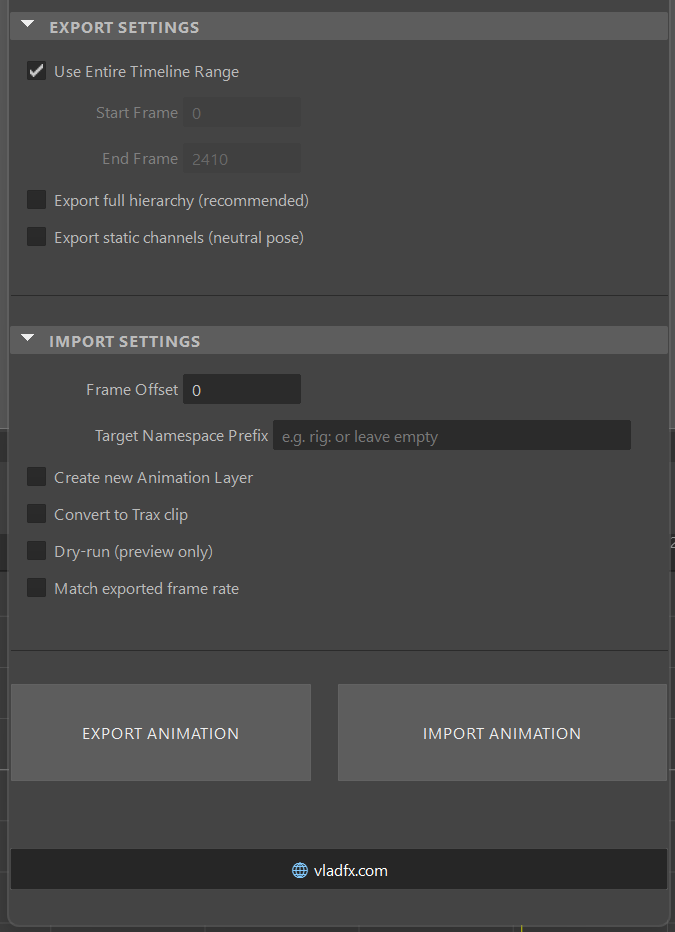
JSON-based bake animation transfer for Autodesk Maya. Export, import, offset, namespace remap, animation layers, and Trax clips — works with any rig, no constraints required.
Bake-based transfer -- no constraints, no connections. Works on FK, IK, spline, and custom rigs.
Optionally export all descendants of selected controls. One click captures an entire character.
Shift imported animation by any frame amount. Perfect for retiming cycles or blending shots.
Target namespace prefix lets you retarget animation between differently named rigs.
Import onto a new layer so you never overwrite existing keys. Non-destructive workflow.
Simulate the import without writing a single keyframe. Validate mapping before committing.
Convert imported animation directly to a Trax clip for nonlinear animation workflows.
Auto-detect and match exported frame rate on import. No more 24→30fps timing drift.
Place VladfxAnimTransfer_v3.3.py in your Maya scripts folder or drag-and-drop into the Script Editor.
Select your animated controls, set the frame range, hit EXPORT ANIMATION, and save the JSON file.
Open the target scene, select the corresponding controls, adjust frame offset or namespace if needed, then IMPORT ANIMATION.
Enable Create new Animation Layer for non-destructive import, or Convert to Trax clip for nonlinear editing.
Metahuman face rigs may take 30–90 seconds. A progress bar shows live status.
Fixed Maya progressWindow hangs on large rigs. Animation Layer creation now auto-sets as active and preferred.
Switched from connection-based to baked keyframe sample-at-frame approach. Works with absolutely any rig topology.